• Welcome to the BMW Scooter Forums. Member registration disables ads and allows you to post and share. Register Here.

Navigation and Phone Hook Ups

Can you hook up your phone or navigation to the screen on the C400 GT?
I'm kind of weak on this subject, so I'll just get the ball rolling, and hope that more knowledgeable folks chime in.

You use the (free) BMW Motorrad Connected app; see https://www.bmwmotorcycles.com/en/e...ication/connectivity.html#/section-navigation and https://www.bmwmotorcycles.com/en/models/urban_mobility/c400gt.html#/section-highlights .

This gets directions from your phone (in addition to who knows what privacy info), and then displays turn-by-turn navigation info. The phone remains in your pocket or the bike's right cubby (as that has a rubber mat and a couple of USB-A ports).

I think that's it. I only used that once in two years, just to sort of check it out. Most (all?) of the time, I don't really care where I am -- until I get to some major road that I'm familiar with, to get my bearings -- but I can see where this might be useful at times.

For spending some money to get full Apple CarPlay or Android Auto on the scoot, you might be interested in this thread by @byee:


Last, if you wind up just mounting your phone to use with Google Maps, etc., be aware of potential vibration issues, particularly with late-model iPhones.
 
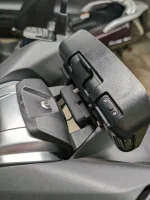
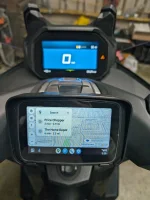
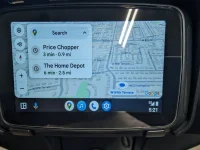
I've been using this device for about a year now with no problems and it connects to my Android phone via Android Auto. Works perfectly with my Sena headset. I bought it from their website but you can also buy these through Amazon. I already had the GPS mount for my C400GT so mounting it was easy and it's getting it's switched power from the connector behind the handlebar cover.
 

Attachments

  • PXL_20240428_102044215.webp
    PXL_20240428_102044215.webp
    317.5 KB · Views: 54
  • PXL_20240428_102032929.MP.webp
    PXL_20240428_102032929.MP.webp
    381.6 KB · Views: 53
  • PXL_20240428_102122549.webp
    PXL_20240428_102122549.webp
    290.7 KB · Views: 51
Jumping in on this topic looking for help. I just bought a used C400X. I have the phone paired and recognized by the scooter. I have the BMW app installed on my phone and I’m registered and logged in and my state maps are downloaded. Nothing showing on the scooters screen but the setup menus. How do I get my map on the scooters screen? I’m not connecting any other comm devices.
 
Does that mean you couldn’t get it to work?
The BMW GPS does not have maps. It has turn by turn instructions which comes from your Smartphone and the BMW Motorrad App. For many people that is all they need.

I could probably do 95% of the navigation I do with Android Auto and have 97% of the fun. I used to use paper mapes, taped to my dash, to navigate 30 years ago.

I ride different trips in 4 different states that were published in Motorcycle magazines along with a couple rides in my area through the Kettle Moraine and an 11 lakes ride, that were published by local motorcyle/ scooter clubs.
Because I wanted the most versatility I could get, I purchased a Garmin Zumo XT GPS connected to my scooter through the front wireing on the scooter. (where wspolack wired his camera.) I like to make my maps on my computer using Garmin BaseCamp then download to the GPS.

Other reasons you may want to go with a dedicated GPS, or Android Auto / Carplay devise is that some of the roads I ride are very twisty. These show up on the maps before I see the "Reduce Speed" signs and I know what kind of hidden curve's or switch back's I'm getting into.

Also all the maps including all of North America is loaded on the GPS. On some of my rides I have lost the ability to navigate by phone because my carrier (T-Moble) had no satilite signal in the area. The Garmin has rarely lost a signal and it can kinda fake it for a little bit when it does. I think this is because all of NA is pre loaded.

 
Last edited:
Back
Top