

Navigation
Install the app
How to install the app on iOS
Follow along with the video below to see how to install our site as a web app on your home screen.
Note: This feature may not be available in some browsers.
More options
-
Welcome to the BMW Scooter Forums. Member registration disables ads and allows you to post and share. Register Here.
You are using an out of date browser. It may not display this or other websites correctly.
You should upgrade or use an alternative browser.
You should upgrade or use an alternative browser.
Service reminder reset
- Thread starter Rootctrl
- Start date
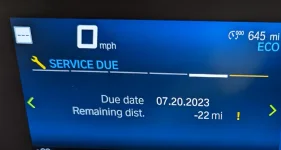
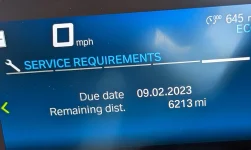

triangletom
Well-known member
Thanks for the confirmation! After reading this, I just ordered an ODBLink LX to reset the initial break-in service reminder. What Bluetooth adapter are you using?
- Thread starter
- #3
Rootctrl
Member
Older discontinued model from the same company. MX Master 3
triangletom
Well-known member
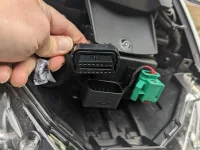
It turned out to be pretty simple to do. Remove front panel over headlights by pulling downward. Unscrew ODB2 cable from it's holder:
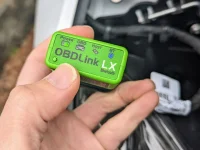
Plug in the ODBLink LX:
Follow the instructions for setting it up on your phone, then fire up Motoscan ($28 for the "Professional" version) to update the service reminder:
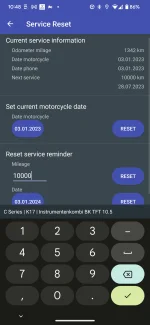
All in all, being able to reset the service reminder costs $118, or about half the cost of just getting the service done. It's probably not worth it for 1-time use, but if you are doing all of your own service, I can see this as a valuable tool. Thanks for the tip!
Plug in the ODBLink LX:
Follow the instructions for setting it up on your phone, then fire up Motoscan ($28 for the "Professional" version) to update the service reminder:
All in all, being able to reset the service reminder costs $118, or about half the cost of just getting the service done. It's probably not worth it for 1-time use, but if you are doing all of your own service, I can see this as a valuable tool. Thanks for the tip!
- Thread starter
- #5
Rootctrl
Member
cheers.
- Thread starter
- #7
korinthias
Member
mgg
Active member
Yes! I am able to reset service minders with it. It does not do as much as some but it does enable you to set service minders and get fault codes. I had to follow the instructions that I have attached here for resetting the minders.
Reset Service Reminder on the BMW C 400gt
1. Gather tools.
OBDLink LX / MotoScan Pro App/ Android Phone/ #25 trox alien wrench.
Before connecting your phone to the OBDLink LX: NOTE: Go into phone: System>Connected Devices> Bluetooth> Select each gear by the device and select forget device. You need to forget all devices so there is no confusion when you pair the OBDLink LX! Now restart your phone!
2. Open the battery panel.
3. Locate OBD reader and pull the cover off.
4. Connect OBD LX to the OBD reader on the bike make sure it has power the green lite should be on.
5. Turn power on to the scooter. You do not need to start it.
NOTE: Now pair your phone to the OBDLink LX!
The Blue Light should be blinking fast. If it is not you need to hit the pair button on the OBDLink LX to pair it. When the Blue Light stops blinking fast you are paired.
6. Open MotoScan on your phone.
7. Select C series.
8. Select (K08) C 400gt.
9. From the list choose Instrument Cluster.
It checks to make sure Bluetooth is connected. Once you get the connect message.
10. Select: Reset Service Reminder.
a. If current motorcycle date is correct. Format: (dd.mm.yyyy) Hit Reset. (If incorrect, correct it and Hit Reset again.)
b. Service Reset 10000. Hit reset.
c. Future Reset Date should be one year later if it is do not change it. Hit Reset If it is not correct change it and then Hit Reset again.
NOTE: (You have to hit reset on all 3 of the Reset buttons to Reset the reminder.)
11. A message comes up saying Reset OK after each reset.
12. The message on the Instrument Cluster should disappear.
13. Turn off bike.
14. Unplug the OBDLink LX put it away and put everything back together.
Reset Service Reminder on the BMW C 400gt
1. Gather tools.
OBDLink LX / MotoScan Pro App/ Android Phone/ #25 trox alien wrench.
Before connecting your phone to the OBDLink LX: NOTE: Go into phone: System>Connected Devices> Bluetooth> Select each gear by the device and select forget device. You need to forget all devices so there is no confusion when you pair the OBDLink LX! Now restart your phone!
2. Open the battery panel.
3. Locate OBD reader and pull the cover off.
4. Connect OBD LX to the OBD reader on the bike make sure it has power the green lite should be on.
5. Turn power on to the scooter. You do not need to start it.
NOTE: Now pair your phone to the OBDLink LX!
The Blue Light should be blinking fast. If it is not you need to hit the pair button on the OBDLink LX to pair it. When the Blue Light stops blinking fast you are paired.
6. Open MotoScan on your phone.
7. Select C series.
8. Select (K08) C 400gt.
9. From the list choose Instrument Cluster.
It checks to make sure Bluetooth is connected. Once you get the connect message.
10. Select: Reset Service Reminder.
a. If current motorcycle date is correct. Format: (dd.mm.yyyy) Hit Reset. (If incorrect, correct it and Hit Reset again.)
b. Service Reset 10000. Hit reset.
c. Future Reset Date should be one year later if it is do not change it. Hit Reset If it is not correct change it and then Hit Reset again.
NOTE: (You have to hit reset on all 3 of the Reset buttons to Reset the reminder.)
11. A message comes up saying Reset OK after each reset.
12. The message on the Instrument Cluster should disappear.
13. Turn off bike.
14. Unplug the OBDLink LX put it away and put everything back together.